
Spanning Tree Protocol (STP) Study Guide
The Definitive Technical Reference for CCNA & Network+ Success
In Layer 2 Ethernet networks, redundancy is a double-edged sword. While it provides backup paths, it can inadvertently create switching loops. This guide explains how STP (IEEE 802.1D) manages these paths to ensure a stable, loop-free network.
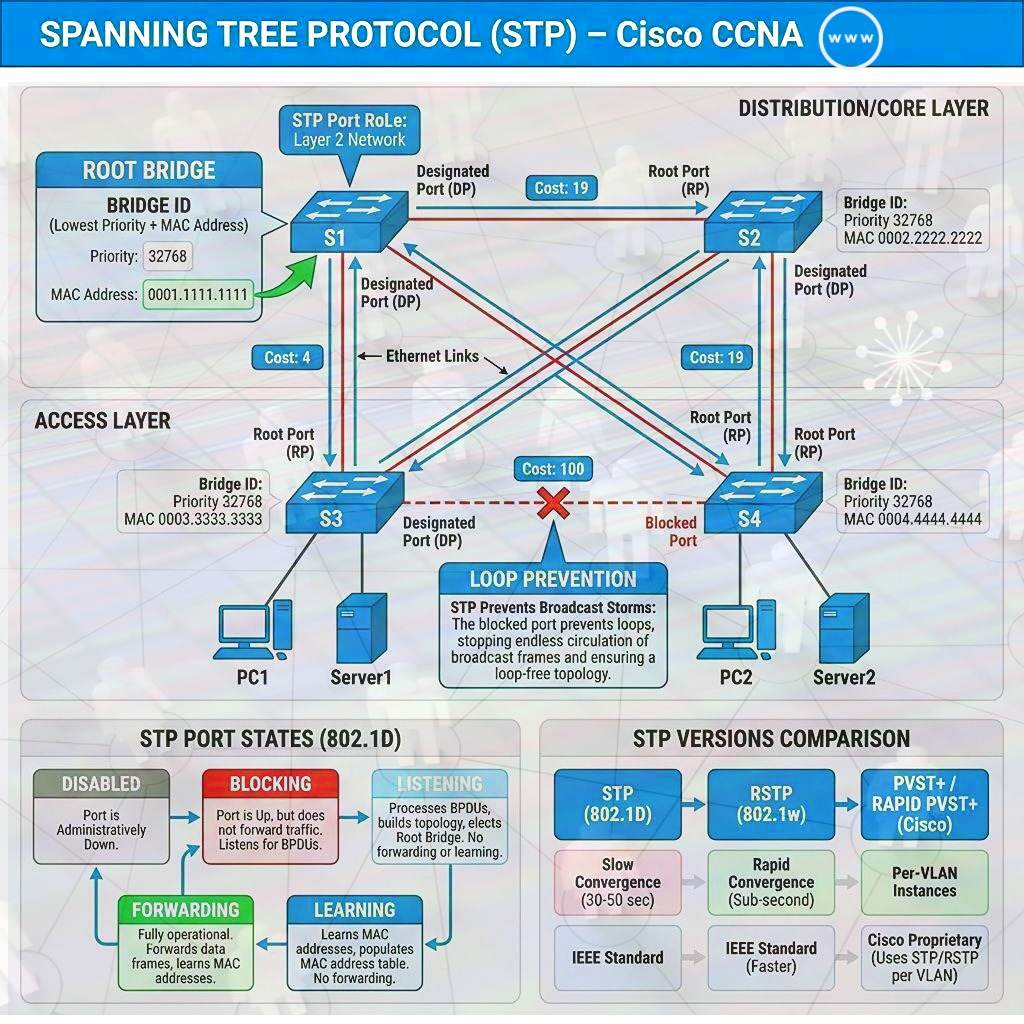
1. The Core Problem: Switching Loops
Without STP, redundant links cause three major issues:
- Broadcast Storms: Broadcast frames (like ARP requests) loop endlessly, consuming all available bandwidth and CPU.
- MAC Table Instability: Switches see the same source MAC address on different ports, causing the MAC table to “flap” or “thrash” constantly.
- Multiple Frame Copies: End devices receive multiple copies of the same unicast frame, leading to application errors.
2. The Election Process: The Root Bridge
The Root Bridge is the logical center of the STP topology. Every other switch calculates its path relative to this switch.
The Bridge ID (BID)
The election is won by the switch with the lowest Bridge ID. The BID consists of:
- Priority (4 bits): Default is
32768. It must be a multiple of4096. - Extended System ID (12 bits): In PVST+, this carries the VLAN ID. The Priority and VLAN ID are added together (e.g., for VLAN 10, the default BID is 32778).
- MAC Address (48 bits): Used as the final tie-breaker if priorities are equal.
3. How STP Converges (The 3-Step Process)
When a network starts or a change occurs, STP follows these steps in order:
- Elect one Root Bridge: The switch with the lowest BID.
- Select Root Ports (RP): Every non-root switch chooses one port with the lowest cumulative root path cost to the Root Bridge.
- Select Designated Ports (DP): One port per segment (link) is chosen to forward traffic. This is the port with the lowest cost to the root on that specific segment. On the Root Bridge, all ports are DPs.
4. STP Port Roles & States
Port Roles
| Role | Description | Status |
|---|---|---|
| Root Port (RP) | The single port on a switch with the best path to the Root Bridge. | Forwarding |
| Designated Port (DP) | The port on a segment that sends/receives traffic for that segment. | Forwarding |
| Alternate/Backup | Ports that would create a loop. They listen to BPDUs but do not forward data. | Blocking |
Port States (802.1D)
Blocking: Discards data; listens for BPDUs to detect the Root Bridge. (Max Age: 20s)
Listening: Discards data; sends/receives BPDUs to determine the path. (Forward Delay: 15s)
Learning: Discards data; begins populating the MAC address table. (Forward Delay: 15s)
Forwarding: Fully operational; sends and receives data.
Disabled: No STP activity; port is administratively down.
5. BPDU: The Language of STP
Switches communicate using Bridge Protocol Data Units (BPDUs).
• Configuration BPDU: Used for the election and ongoing maintenance.
• Topology Change Notification (TCN): Sent by a non-root switch when a link goes up or down.
• Hello Timer: Sent every 2 seconds by the Root Bridge.
• Max Age: Time a switch waits for a BPDU before declaring a neighbor “dead” (Default: 20s).
• Forward Delay: Time spent in Listening and Learning states (Default: 15s each).
6. STP Security & Optimization
PortFast
Immediately transitions an access port to Forwarding. Only use on ports connected to end devices (PCs, printers).
BPDU Guard
Security feature that puts a PortFast-enabled port into err-disable state if it receives an unauthorized BPDU.
Root Guard
Prevents an unauthorized switch from becoming the Root Bridge if its priority is lower than current root.
Loop Guard
Prevents a blocked port from transitioning if it stops receiving BPDUs (stops unidirectional link loops).
7. Path Cost Reference (IEEE Revised)
| Link Speed | 802.1D Cost (Short) | 802.1w Cost (Long) |
|---|---|---|
| 10 Mbps | 100 | 2,000,000 |
| 100 Mbps | 19 | 200,000 |
| 1 Gbps | 4 | 20,000 |
| 10 Gbps | 2 | 2,000 |
8. STP Variants
| Protocol | IEEE Standard | Key Characteristics |
|---|---|---|
| STP | 802.1D | Original; convergence takes 30-50s. High latency. |
| RSTP | 802.1w | Rapid STP; converges in <2s. Modern standard. |
| PVST+ | Cisco Prop. | Per-VLAN STP; allows load balancing across links by VLAN. |
| MSTP | 802.1s | Multiple STP; maps groups of VLANs to specific STP instances. |
9. Frequently Asked Questions & Interview Prep
Click on a question card to reveal the technical answer.
Final Summary for the Exam
Lower is better for Priority, MAC, and Cost election criteria.
Root Bridge = Lowest BID (Priority + Extended ID + MAC).
Convergence: 802.1D (30-50s) vs 802.1w (Rapid – under 2s).
PortFast is for edge devices; BPDU Guard is the critical security companion.