
To boost your self-confidence and communication skills. focus on these simple habits.
Presence, speech, documents, and meetings — the four instruments of professional communication. This guide breaks each into rehearsable steps, real templates, and side‑by‑side do/don’t examples you can apply the same day.
First & Last Impressions — the 8‑Presence framework
People form an opinion of you in the first few seconds, and remember the last part of any conversation more than the middle. So practise your opening and closing on purpose — the same way you’d practise the main content.
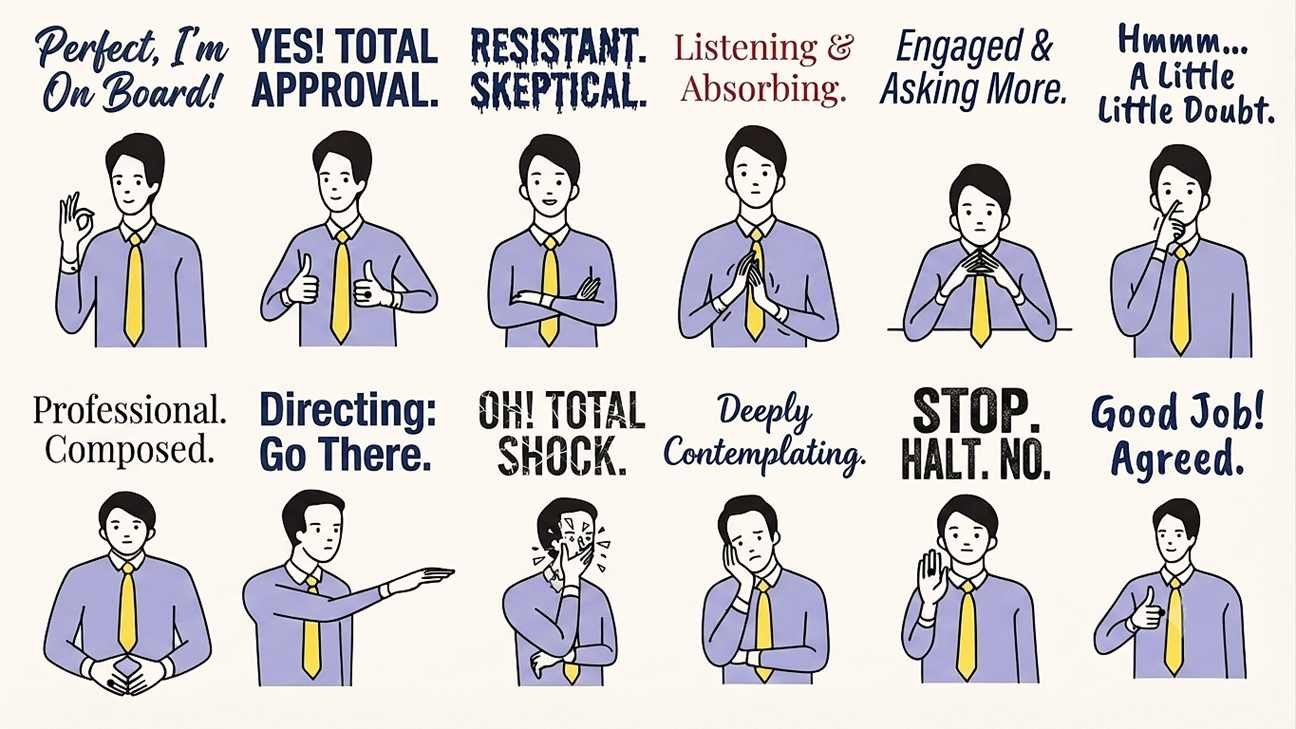
.
Arrive composed
Settle your breathing and posture 30 seconds before contact — not while shaking a hand.
Open the eyes first
Make eye contact before you speak. It signals attention arrives before words do.
Lead with the face
A brief, genuine smile (roughly 1 second) reads as warmth; a held smile reads as performance.
Offer the hand cleanly
Web‑to‑web grip, two firm pumps, release. Match, don’t out‑squeeze.
Name and anchor
Say their name once in the first exchange — it fixes the interaction in memory for both sides.
Mirror the register
Match their pace and formality for the first minute before introducing your own tone.
Close with a forward line
End on a concrete next step (“I’ll send the notes by Friday”), not a vague “nice talking.”
Exit at the peak
Leave the room on a positive beat — people remember endings more than middles, so finish on a good note.
Listen more than you speak
Nod, ask one follow‑up question, and let silences sit. People rate good listeners as more likeable than good talkers.
Eye‑contact zones
Hold the “business triangle” (eyes to mid‑forehead) in formal talk; drop to the wider social triangle only once rapport is set. Look away briefly every 4–5 seconds — unbroken staring reads as confrontation, not confidence.
Handshake types
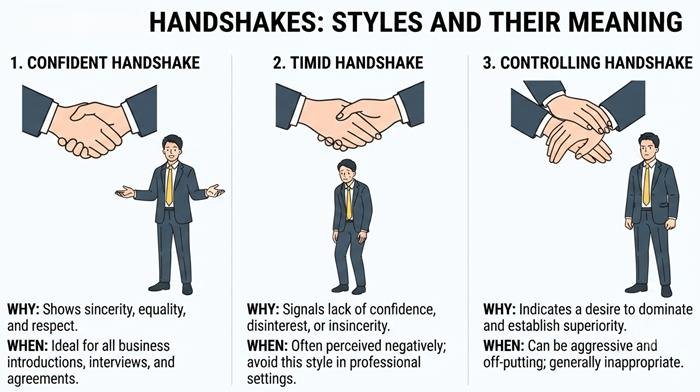
.
Grip firmness should mirror the counterpart’s — not overpower it. In medical or cross‑cultural settings, a light hand‑to‑forearm touch or nod can replace a handshake respectfully.
Open vs. closed body language
Arms uncrossed, torso angled toward the other person, feet pointed at them — these three cues alone shift perceived approachability more than facial expression does.
Gesture zones while speaking
Keep hand gestures inside the “gesture box” between chest and waist. Use open palms to signal honesty; point with a full hand, never a single finger.
Sitting posture — desk & meetings
Feet flat, back supported by the chair, screen at eye level, elbows near 90°. A slumped, forward‑craned neck over a laptop is the most common posture fault in long meetings and video calls.
Standing posture types
Hands loosely at your sides or lightly gesturing reads as approachable. Hands on hips can read as confident in small doses but controlling if held too long. Crossed arms almost always reads as closed off, even when you just feel cold.
Where to put your feet
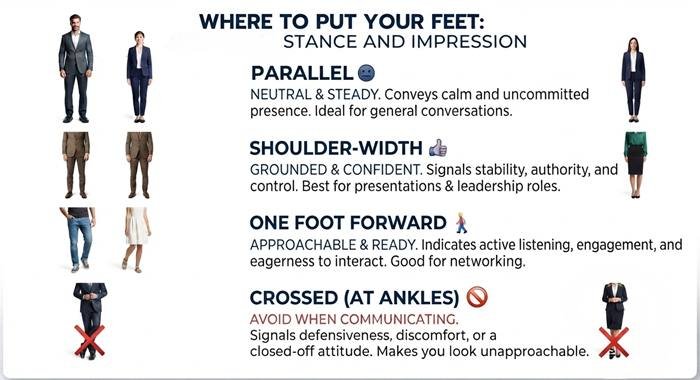
.
A shoulder-width stance reads as grounded without effort. Crossed ankles or feet while standing to present can make you look unsteady or unsure, even if your voice sounds fine.
20+ Interaction Examples — do this, not that
Real situations across eye contact, gesture, posture, and handshake, each with the visible cue that makes or breaks the moment.
A first meeting, broken into visible beats
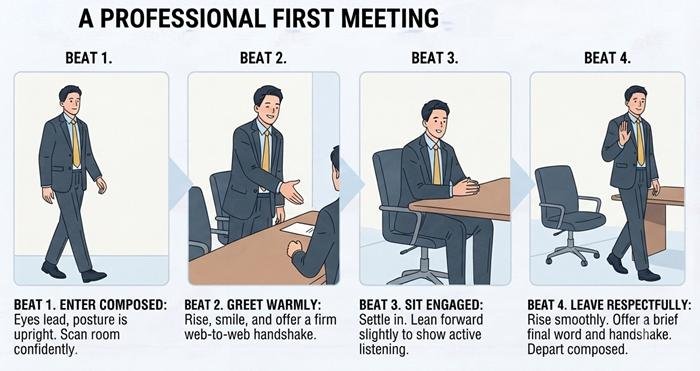
.
Examples 01–02 below, shown as one continuous moment: composed entrance, led by the eyes, closed by a clean handshake before sitting down.
Entering the room
Sitting down
Making an offer
Joining a group
First 10 seconds
Pushing back in a meeting
Greeting a senior figure
Walking on stage
Scanning the audience
Where to look
Delivering criticism
Staying open
Multiple speakers
Meeting a new client
Sealing agreement
Delivering a diagnosis
Answering a professor
No visual cues available
Unexpected encounter
Ending a meeting
Facing an evaluation panel
A colleague raises their voice
Talking With Several People at Once
One-on-one skills don’t scale up automatically. In a group, your job shifts from “hold this one person’s attention” to “make sure everyone feels included” — even the quiet ones.
Stand or sit in an open shape
Form a semi-circle, not a straight line — everyone should be able to see everyone else’s face.
Share your eye contact
Spend roughly equal time looking at each person over the conversation, not just the loudest one.
Use names to bring people in
“[Name], what do you think?” is the simplest way to include someone who hasn’t spoken.
One conversation at a time
If it splits into side chats, pause and bring the room back with a short question to everyone.
Signal you’re about to speak
A small forward lean or raised hand avoids talking over someone in a group of four or more.
Summarise before moving on
“So we agree on X, and Y is still open” keeps a mixed group aligned before the topic changes.
Group greeting — the semi-circle
Two people shaking hands in the middle of a group should still angle their bodies so the others feel included, not shut out of a private conversation.
Worked example — a 5-person project meeting
You’re leading a review with your manager, two teammates, and one quiet new hire.
- Open by looking around the group, not just at your manager: “Thanks all for joining — quick 20-minute check-in.”
- When your manager speaks the longest, still glance toward the others every few sentences so they stay part of the conversation.
- Draw the new hire in directly: “[Name], you looked at this yesterday — anything to add?”
- If two teammates start a side debate, step in gently: “Let’s park that and come back after — [next agenda item].”
- Close by summarising decisions out loud and confirming everyone heard the same thing.
Public Speech & Presentations
A speech is judged on structure, delivery, and recovery — in that order. Build the skeleton first, then layer in voice and body.
Speech structure
Three supporting points is the ceiling most audiences retain. Open and close on the same image or line — a “callback” — to bookend the talk memorably.
Voice & pace controls
Vary pace: slow down for the key sentence, then pause for two full seconds. Silence is the most underused tool in a speech — it signals importance without a single word.
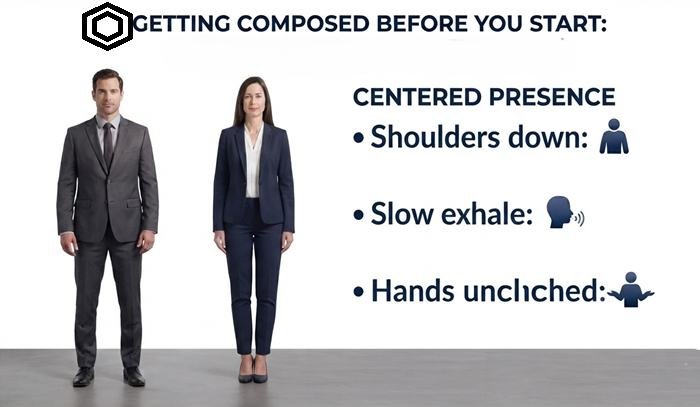
Getting composed before you start
.
Before you’re introduced: drop your shoulders, take one slow breath out longer than the breath in, and unclench your hands. A calm body sends a calm signal to your own brain, not just the audience.
| Element | Weak version | Strong version |
|---|---|---|
| Opening | “Today I’m going to talk about…” | A one‑line story or surprising fact that leads into the topic. |
| Slides | Dense paragraphs read aloud | One idea per slide; you narrate, the slide anchors. |
| Hands | Pockets or clutching notes | Open gestures inside the gesture box, notes glanced not read. |
| Q&A | Answering the first word you hear | Pause, repeat the question in your own words, then answer. |
| Closing | “That’s it, thanks.” | Callback to the opening line + one clear next step. |
How to Represent of Reports, Agendas, Agreements & Tenders
Every business document has a shape readers expect. Follow that shape and even a dense report feels clear and organised.
Reading the room before you write
Write the way you’d want to read on a busy day: the headline finding at the top, the supporting numbers just below it, and the detail available for anyone who wants to go further.
Structure
- Chairperson’s letter — tone for the year in under a page.
- Organisation overview — mission, structure, key milestones.
- Performance review — financial and operational highlights.
- Financial statements — balance sheet, P&L, cash flow, notes.
- Governance — board composition, committees, compliance.
- Outlook — priorities and risks for the coming year.
- Auditor’s report & appendices.
Notes
Lead every section with the number that matters most, then explain it — readers scan for figures before prose. Keep the chairperson’s letter honest about setbacks; credibility rises when risk is named, not hidden.
Standard agenda order
- Welcome & quorum confirmation
- Apologies for absence
- Approval of previous AGM minutes
- Chairperson’s / director’s report
- Presentation of annual accounts
- Appointment / re‑appointment of auditor
- Election or re‑election of board members
- Special resolutions (if any)
- Any other business (AOB)
- Close of meeting
Notes
Circulate the agenda and prior minutes at least 14–21 days ahead depending on your governing rules. Timebox each item on the printed agenda so AOB doesn’t swallow the meeting.
Structure
- Period covered and report author
- Summary status — on track / at risk / delayed, one line
- Completed since last report
- In progress with % complete
- Blockers & issues with owner and needed decision
- Budget / resource status if applicable
- Next period plan
Notes
Put the status colour or one‑line verdict at the very top — a reader should know the health of the project before reading a single detail.
Core clauses
- Parties & effective date
- Purpose / scope of agreement
- Deliverables & timelines
- Payment terms
- Confidentiality
- Termination conditions
- Liability & indemnity
- Dispute resolution & governing law
- Signatures
Notes
Define every ambiguous term (e.g. “business day”, “deliverable acceptance”) in a definitions clause up front — most disputes trace back to an undefined word.
Response structure
- Cover letter — reference number, contact, validity period
- Executive summary — why you, in one page
- Compliance matrix — line‑by‑line against tender requirements
- Technical proposal — methodology, timeline, team
- Financial proposal — pricing in the requested format
- Past performance / references
- Statutory documents — registration, tax, insurance certificates
Notes
Mirror the tender document’s own headings and numbering in your compliance matrix — evaluators score faster, and disqualification for “non‑responsive” format is common and avoidable.
Structure
- Meeting title, date, time, location/platform
- Attendees & apologies
- Approval of previous minutes
- Agenda items discussed, in order
- Decisions made
- Action items — task, owner, due date
- Next meeting date
Notes
Record decisions and actions verbatim where possible — minutes are the record people are held to later. Distribute within 24–48 hours while memory is fresh.
Structure
- Problem statement
- Proposed solution
- Scope & deliverables
- Timeline & milestones
- Cost / investment required
- Expected outcome / ROI
- Call to action
Notes
Frame the problem in the reader’s terms before pitching your solution — a proposal that opens with your product reads as a sales pitch, not a fix.
Structure
- To / From / Date / Subject header
- Purpose — one sentence
- Background (only if needed)
- Key message / decision
- Action required, with deadline
Notes
A memo earns its length in inverse proportion to urgency — the more urgent, the shorter it should be. State the action required in the first three lines.
Project & Online Meetings
A meeting is really three short documents: the invite, the notes, and the follow-up. Get all three right and the meeting itself can run shorter.
Before
Agenda + objective sent 24h ahead, with pre‑reading if needed.
Opening
State the objective and end time in the first 30 seconds.
During
One thread of discussion at a time; park side‑topics in a visible “parking lot.”
Closing
Read back decisions and owners aloud before ending.
After
Minutes + action list sent within 24–48 hours.
| In‑person meeting | Online meeting |
|---|---|
| Arrive 5 minutes early, choose seat deliberately | Join 2–3 minutes early, test mic/camera before others arrive |
| Eye contact rotates naturally around the table | Look at the camera when speaking, not the gallery view |
| Side conversations are visible and self‑correcting | Use chat for side notes; mute when not speaking |
| Whiteboard for shared visuals | Screen‑share with a named, up‑to‑date file — never “let me find it” |
| Handshake / nod to close | Verbal close: restate actions before ending the call |
Meeting table — where to sit
Sitting beside a decision‑maker signals alliance; sitting directly opposite can read as challenge. Choose your seat before the meeting, not by whatever’s left.
Video call — camera framing
Position the camera at eye level, frame head-and-shoulders (not just a forehead or a distant torso), and glance at the lens — not your own face — when you’re making a point.
Pre‑meeting email
Post‑meeting report & issue email
Educational, hospital, and other contexts should also be improved.
The core skills stay constant; the register and pacing shift by setting.
Academic
- Viva / defence: pause 2 seconds before answering — it reads as considered, not unprepared.
- Address the panel as a whole, then the specific questioner.
- Cite uncertainty honestly (“I’d need to verify that”) over guessing.
- Slides: one figure or claim per slide, cited sources visible.
Hospital / Clinical
- Sit at the patient’s eye level, not standing over the bed.
- Deliver news slowly, check understanding before adding detail (“teach‑back”).
- Keep hands visible and movements slow — reduces perceived threat.
- Confirm consent verbally before any procedure explanation ends.
Corporate / Office
- Match the room’s formality before adding humour.
- In hierarchy‑sensitive cultures, direct disagreement with seniors goes in private, not the open floor.
- Written follow‑up after verbal agreement, always.
- Dress and posture calibrate to the most senior person present.
Government / Tender Panels
- Answer the exact question asked before adding context.
- Reference the tender’s own clause numbers when responding.
- Keep tone formal and evidence‑led; avoid persuasive language panels are trained to discount.
- Written record of every verbal clarification given during the process.