
HPE PROLIANT SERVER REFERENCE
VISUAL COMPONENT DIAGRAMS · FRONT & REAR PANEL · INTERNAL LAYOUT
GEN10 / GEN11
RACK · TOWER · BLADE · MICRO
COMPONENT DETAIL + TROUBLESHOOTING
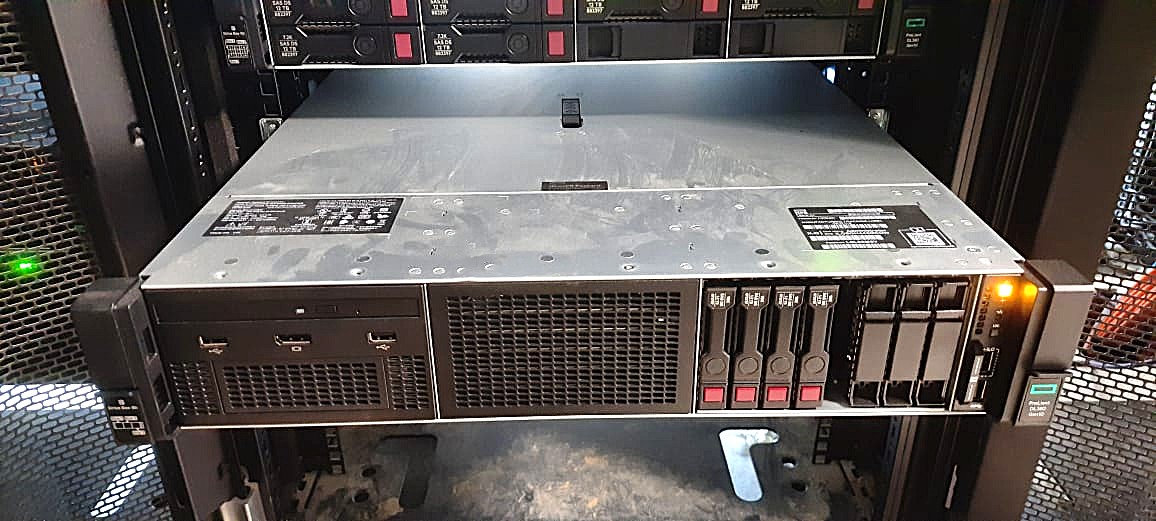
HPE ProLiant DL1000
RACK 1U▶ FRONT PANEL VIEW
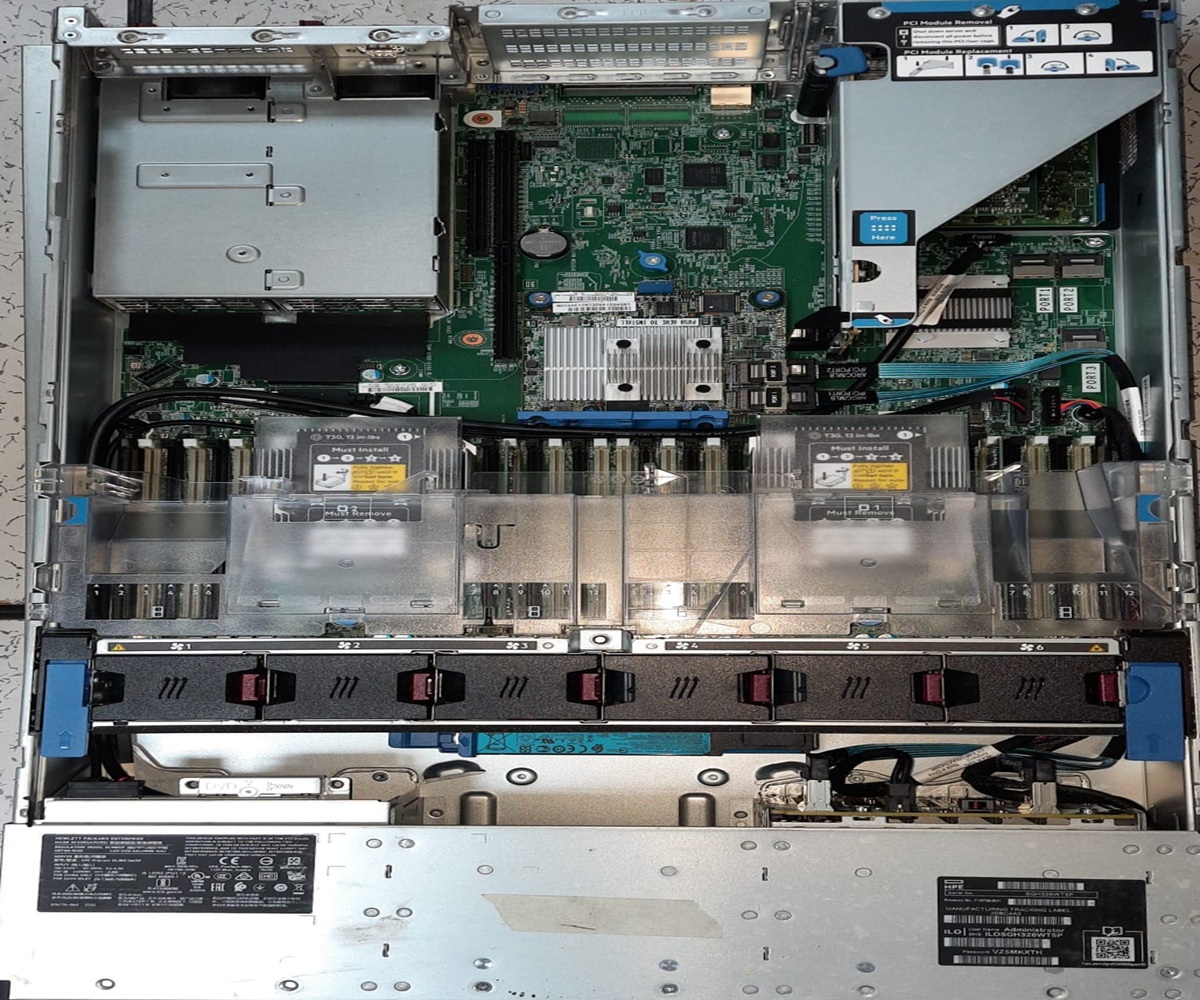
▶ INTERNAL BOARD LAYOUT
.
FORM FACTOR
1U Rack
MAX CPU
2× Xeon SP Gen4
MAX RAM
4TB DDR5 ECC
DRIVE BAYS
8× 3.5″ LFF SAS/SATA
NETWORK
4× 1GbE + 2× 10GbE
POWER
2× 750W Hot-Swap
.
CPU Socket
DIMM Slots
PCIe Slots
Status LED
iLO Management
TPM / Security
CPU · PROCESSOR
Intel Xeon Scalable Gen4 (Sapphire Rapids) — LGA4677
Server-grade CPU with ECC memory support, PCIe 5.0 lanes, and hardware RAS features unavailable in consumer chips. Up to 60 cores for parallel workloads, virtual machines, and containerised apps.
COMMON ISSUES & FIXES
- POST fails with red CPU LED → reseat CPU, check for bent pins in socket. Replace TIM if absent.
- Overheating / throttling → verify heatsink torque (12 in-lbs), confirm fan operation, check airflow baffles seated.
- Only 1 of 2 CPUs detected → CPU1 socket requires CPU0 populated first. Missing CPU1 disables half the DIMM slots.
- DIMM channels offline → each CPU owns its own memory channels; unpopulated CPU = those DIMMs ignored.
DDR5 ECC DIMM SLOTS
DDR5-4800 RDIMM / LRDIMM — 16× slots (8 per CPU)
ECC (Error-Correcting Code) memory detects and corrects single-bit errors in real time, preventing silent data corruption — critical for databases and financial applications. RDIMM buffers reduce signal load for large capacities.
COMMON ISSUES & FIXES
- POST memory error / reduced capacity → reseat all DIMMs. Check IML for uncorrectable ECC errors.
- Wrong DIMM type installed → DL1000 requires RDIMM or LRDIMM only. UDIMMs not supported.
- Slots must be populated in order A1→A2→B1→B2… → mixing channels causes performance degradation.
- Amber DIMM LED → that slot has a failed module; replace with same-spec DIMM.
HPE SMART ARRAY CONTROLLER
P408i-a SR Gen10 — 12Gb SAS / SATA, 4GB FBWC Cache
Hardware RAID offloads parity calculations from the CPU, enabling RAID 0/1/5/6/10/50/60 without CPU overhead. Flash-Backed Write Cache (FBWC) accelerates writes while protecting data through power loss.
COMMON ISSUES & FIXES
- Cache degraded warning → FBWC capacitor or flash module has failed; replace the controller cache module.
- Drive not recognised → verify SAS cable seating, check IML for PHYERR count; replace SAS expander if high.
- RAID rebuild slow → normal; avoid reboots during rebuild. Use HPE SSA or iLO to monitor progress.
- Controller not detected → reseat in PCIe slot; ensure slot has adequate power (check riser power connector).
iLO 6 MANAGEMENT PROCESSOR
HPE iLO 6 — Dedicated ARM-based BMC
iLO (Integrated Lights-Out) provides out-of-band management: power on/off, KVM console, BIOS config, health monitoring, and firmware updates — even when the OS is down or the server is powered off (as long as standby power exists).
COMMON ISSUES & FIXES
- Cannot reach iLO web UI → check dedicated iLO NIC cable. Assign IP via iLO RBSU during POST (F8).
- iLO locked after failed login attempts → wait lockout period or reset iLO via iLO physical reset pin on rear panel.
- iLO firmware outdated → update via iLO > Firmware Update or use HPE SUM. Outdated iLO blocks some Gen11 features.
- iLO shared vs dedicated port → shared port uses host NIC and can be blocked by OS firewall; use dedicated port for reliability.
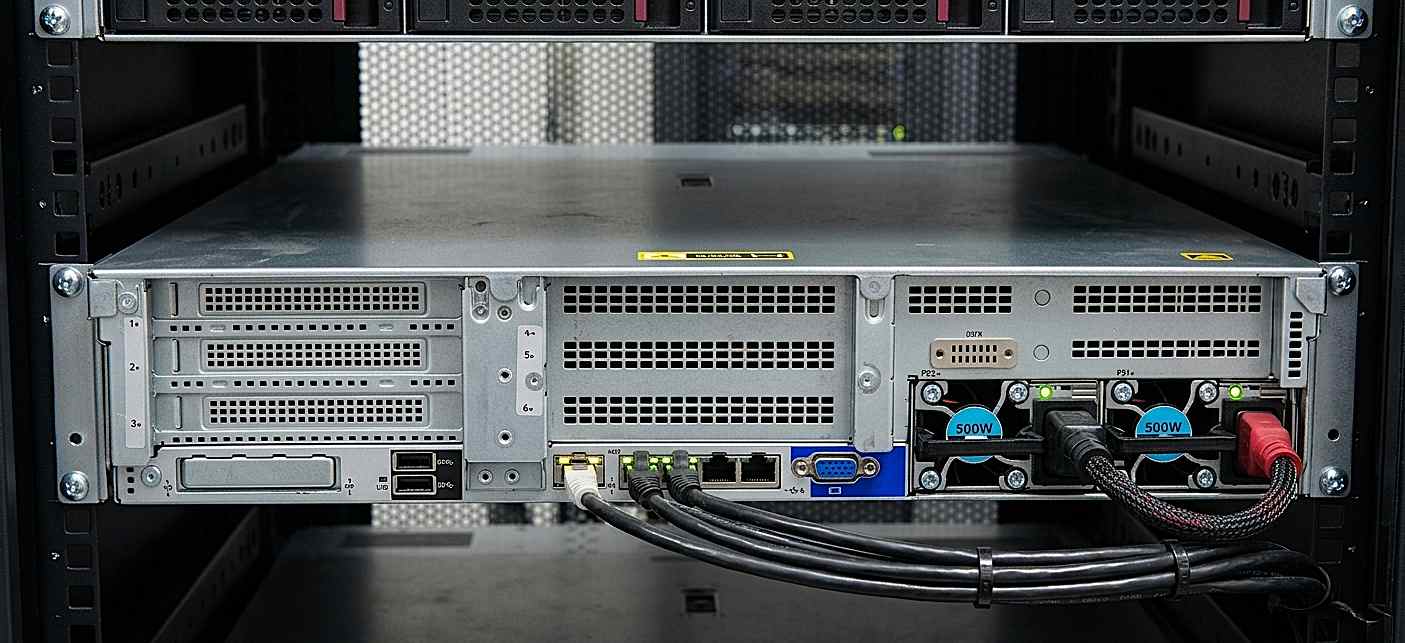
REDUNDANT PSU (2× 750W)
HPE FlexSlot Platinum Hot-Plug PSU
Two PSUs in active-active (load-sharing) configuration ensure the server continues operating if one PSU fails or is removed for replacement without downtime. Platinum efficiency (94%+) reduces heat and electricity cost.
COMMON ISSUES & FIXES
- PSU fault amber LED → swap with a known-good PSU. Use HPE genuine PSUs only — third-party units may not communicate fault status.
- Server won’t power on → verify both PSUs receive AC power. Check IEC C13 cables and PDU circuit breakers.
- Non-redundant warning with 2 PSUs → verify both PSUs are the same wattage and HPE part number. Mixed wattage disables load-sharing.
- Power capping alert → server has exceeded defined power cap. Increase cap in iLO Power Settings or reduce DIMM population.
TPM 2.0 MODULE
HPE Trusted Platform Module 2.0 — fTPM (firmware-based)
TPM stores cryptographic keys, certificates, and platform measurements. Required for BitLocker, Secure Boot enforcement, Windows 11, and compliance frameworks (FIPS, NIST). Hardware root-of-trust ensures firmware integrity on every boot.
COMMON ISSUES & FIXES
- TPM not detected → enable TPM in BIOS (System Configuration > BIOS/Platform Configuration > Server Security > TPM).
- BitLocker recovery key prompted after firmware update → expected when PCR values change. Store recovery keys in AD or Azure AD before updates.
- TPM clear required → use iLO or BIOS “Clear TPM” option. Warning: this permanently deletes all TPM-protected keys.
HPE ProLiant DL2000
RACK 2U MULTI-NODE▶ FRONT PANEL — MULTI-NODE (4× SERVER TRAYS)
FORM FACTOR
2U Multi-Node (4)
CPU/NODE
2× Xeon or AMD EPYC
RAM/NODE
Up to 512GB DDR4
DRIVES/NODE
4× 2.5″ SAS/SATA/NVMe
NETWORK
2× 10GbE per node
POWER
4× Shared 1200W PSU
NODE TRAY (SERVER CARTRIDGE)
4× Independent Compute Nodes in 2U Chassis
Each hot-plug tray is a complete independent server with its own CPU(s), RAM, drives, NICs, and iLO. The chassis shares only PSU and cooling infrastructure, dramatically improving density (4 servers in 2U = half the rack space of 4× 1U).
COMMON ISSUES & FIXES
- Node won’t power on → verify chassis PSU health first; a dead shared PSU disables all nodes.
- Node removed but workload continues → each node is independent; removing one does not affect others.
- Node shows unknown in iLO → assign individual iLO IP per node via the onboard iLO port on each tray’s rear.
SHARED CHASSIS PSU RAIL
4× 1200W Hot-Plug Platinum PSUs — Shared Bus
Multi-node chassis pools PSU capacity across all nodes. Any PSU failure is absorbed by the remaining units without impacting node operation, reducing total PSU count vs. individual 1U servers.
COMMON ISSUES & FIXES
- All nodes lose power → check upstream PDU breaker and both AC feeds to chassis.
- PSU mismatch warning → all PSUs must be identical part numbers and wattage for load-sharing.
- Chassis fans at max speed → indicates thermal event or failed fan module; check fan tray in rear of chassis.
PER-NODE NIC
2× 10GbE SFP+ per node (onboard FlexLOM)
Each node has its own independent network interface, allowing separate VLANs, IP subnets, and bonding configurations per node — same isolation as separate physical servers but in a 2U footprint.
COMMON ISSUES & FIXES
- No link on 10GbE → verify SFP+ transceiver type (HPE-branded preferred). Check switch port speed and MTU settings.
- NIC shows in OS but no traffic → check iLO FlexLOM settings; node BIOS may have NIC disabled for PXE.
CHASSIS COOLING MODULE
Shared Hot-Plug Fan Trays — HPE Active Cool
Cooling is centralised in the chassis for all nodes. Redundant hot-plug fans mean a single fan failure won’t overheat nodes; the remaining fans ramp up automatically (N+1 fan redundancy).
COMMON ISSUES & FIXES
- Fan module amber LED → replace that fan tray immediately; it has failed or will fail soon.
- All fans at 100% → check chassis ambient temp sensor. Blocked rear exhaust or hot aisle containment issues are common causes.
- Fan speed not decreasing after temp drops → iLO thermal policy may be set to “increased cooling”; adjust in iLO Thermal Configuration.
HPE ProLiant DL-classic
RACK 2U CLASSIC▶ SYSTEM BLOCK DIAGRAM — DL380/DL360 ARCHITECTURE
ARCHITECTURE
NUMA 2-Socket
CPU BUS
UPI 3.0 11.2GT/s ×2
STORAGE BUS
12Gb SAS / PCIe5 NVMe
MANAGEMENT
iLO 6 Agentless
NETWORK
FlexFabric 25GbE SR-IOV
SECURITY
Silicon Root of Trust
HPE FlexFabric NIC
Converged Network Adapter — 2×25GbE + 2×10GbE, SR-IOV
FlexFabric consolidates Ethernet, FCoE (Fibre Channel over Ethernet), and iSCSI onto a single adapter, eliminating separate FC HBAs. SR-IOV (Single Root I/O Virtualisation) allows a single NIC port to appear as multiple virtual NICs inside VMs — essential for high-density VMware or Hyper-V environments.
COMMON ISSUES & FIXES
- FCoE LUNs not visible → ensure FCoE is enabled in FlexLOM BIOS settings and switch FCF (FCoE Forwarder) is configured.
- SR-IOV VFs not appearing → enable SR-IOV in BIOS (Advanced > PCI Configuration) and install VF driver in VM guest.
- 25GbE link down → check DAC cable length (≤3m for passive), ensure switch port supports 25GbE and FEC is matching (RS-FEC).
UPI INTERCONNECT BUS
Intel Ultra Path Interconnect 3.0 — 11.2GT/s ×2 links
UPI is the CPU-to-CPU coherency bus that makes both sockets appear as a single NUMA (Non-Uniform Memory Access) system to the OS. Without UPI, CPU0 cannot access CPU1’s memory banks directly. Two UPI links provide bandwidth and redundancy.
COMMON ISSUES & FIXES
- NUMA latency high in benchmarks → confirm both CPUs are same stepping and speed. Mismatched CPUs downgrade UPI to lower speed.
- System runs in degraded UPI mode → one UPI link failed; check POST messages. May need CPU or motherboard replacement.
- Only 1 NUMA node visible in OS → second CPU not installed. A missing CPU1 means its memory channels are also unavailable.
HPE Smart Array P816i-a
RAID Controller — 12Gb SAS, 4GB Flash-Backed Write Cache
The P816i supports RAID 0, 1, 5, 6, 10, 50, 60 with up to 16 SAS/SATA physical drives. The 4GB FBWC battery-backed cache absorbs burst writes and protects against data loss during power events while maintaining sequential write performance.
COMMON ISSUES & FIXES
- Cache module failed → replace FBWC capacitor pack; RAID continues but at reduced write performance (write-through mode).
- Logical drive failed → confirm physical drive replacement; trigger rebuild via HPE SSA or iLO. Always replace with equal or larger capacity.
- Array controller degraded after reboot → check SAS backplane cable connections; loose cables cause intermittent drive drop-outs.
SILICON ROOT OF TRUST
HPE Gen10/11 Hardware Security — Immutable Boot ROM
Unlike software-only Secure Boot, HPE’s Silicon Root of Trust uses a cryptographically signed immutable ROM to verify BIOS firmware before execution. This prevents BIOS-level malware (rootkits) that persist through OS reinstalls. Ensures firmware integrity from factory to rack.
COMMON ISSUES & FIXES
- BIOS integrity failure at POST → the System ROM has been tampered or corrupted. Use iLO to restore a known-good BIOS image.
- Firmware downgrade blocked → Silicon RoT prevents rolling back to vulnerable older firmware versions by design.
- Secure Boot failing for custom OS → enroll the OS shim certificate in BIOS > Security > Secure Boot > Custom Mode > DB.
HPE ProLiant MicroServer Gen10
TOWER · MICRO▶ FRONT PANEL (TOWER ORIENTATION)
FORM FACTOR
Mini Tower
CPU
Xeon E-2400 (single)
MAX RAM
32GB ECC DDR5
STORAGE
4× 3.5″ non-hot-plug
NETWORK
2× 1GbE onboard
POWER
180W External PSU
INTEL XEON E-2400 (SINGLE SOCKET)
Xeon E-2400 (Alder Lake-P) — LGA1700, up to 8P+8E cores
The E-series Xeon is Intel’s entry-level server CPU designed for SMB and edge workloads. It supports ECC memory (critical for data integrity), has vPro remote management, and fits into a low-power envelope suitable for the external 180W PSU. It offers stronger per-core performance than higher-core-count server CPUs at lower cost.
COMMON ISSUES & FIXES
- Server runs hot with single fan → MicroServer has limited airflow; ensure rear exhaust path is unobstructed. Do not rack with zero clearance above/below.
- CPU throttling under load → verify fan is spinning (single fan failure = immediate thermal throttle). Check iLO temperature log.
- ECC errors increasing → run HPE Insight Diagnostics memory test. Replace DIMMs if correctable ECC count is rising.
EXTERNAL 180W AC ADAPTER (PSU)
Laptop-Style External Power Brick — 100–240V Universal
The external PSU reduces the server’s internal component count and thermal load, enabling the compact chassis. The universal input (100–240V) supports global deployment. However, unlike rack servers, there is no redundant PSU option — a single-point-of-failure for power.
COMMON ISSUES & FIXES
- Server won’t power on → check PSU DC connector seating. Test with a known-good HPE-certified adapter (HPE P/N: 873537-001).
- Do not use third-party PSU bricks → voltage tolerance and protection circuits differ; using incompatible adapters can damage the motherboard.
- PSU overheating → ensure brick is not covered or inside enclosed space; it dissipates heat directly through its casing.
- Power lost and server won’t start → check AC outlet, surge protector, and cable. The MicroServer has no UPS port — consider adding a UPS.
4× 3.5″ NON-HOT-PLUG BAYS
SATA III (6Gb/s) — Non-hot-plug, front-loading trays
Designed for SMB NAS-style storage (file servers, backup targets, Plex/NAS). Non-hot-plug means the server must be powered off before removing drives — acceptable for its target use case. Supports JBOD or software RAID (Windows Storage Spaces, ZFS, mdadm).
COMMON ISSUES & FIXES
- Drive not detected → power off fully before reinserting drive; SATA is not hot-swap. Reseat SATA backplane cable if bay never detects drives.
- No hardware RAID → MicroServer uses B120i software RAID (very limited). For production RAID, add a PCIe RAID card in the ×16 slot.
- Bay 4 (optical) can hold a 5th drive via SATA converter cable — useful for adding an M.2 NVMe adapter card.
HPE iLO 5 (STANDARD)
HPE Integrated Lights-Out 5 — Shared Network Port
The MicroServer ships with iLO Standard (not Advanced), providing basic remote power on/off, KVM console, and health monitoring via the dedicated iLO port or shared host NIC. iLO 5 on the MicroServer allows remote management for headless deployments (home lab, remote branch office).
COMMON ISSUES & FIXES
- iLO web console not accessible → assign IP in BIOS iLO Configuration screen during POST. Default is DHCP.
- iLO Advanced features not available → purchase iLO Advanced license to unlock graphical remote console, video record, and REST API.
- iLO Shared NIC vs. dedicated → use dedicated iLO port for reliability; shared port may lose management access when OS changes NIC config.
HPE ProLiant SL6500 Scalable System
SCALE-OUT 4U▶ FRONT VIEW — 4U SCALE-OUT CHASSIS (4× HOT-PLUG TRAYS)
CHASSIS
4U Scale-Out (SL6500)
TRAYS
4× Hot-Plug Trays
NODES/TRAY
2× Compute / 1× Storage
MAX STORAGE
336TB Raw (25× 3.5″ LFF)
GPU OPTION
NVIDIA A100/H100 HBM2e
POWER/TRAY
2× 750W–1200W Shared
Active/Online
CPU Module
Drive Bay
GPU Accelerator
PSU / Cooling
HOT-PLUG COMPUTE TRAY (SL2x170z)
2× Independent Compute Nodes per Hot-Plug Tray
Each hot-plug tray slides in/out of the 4U chassis in seconds without powering down the chassis. Two nodes per tray share tray-level PSU but have independent CPUs, RAM, drives, and network. This architecture enables rapid capacity scaling: add a tray = add two servers instantly.
COMMON ISSUES & FIXES
- Tray not recognised on insertion → check chassis backplane connector pins for damage. Reseat tray firmly until latch clicks.
- Node A powers on but not Node B → Node B may have independent power issues; check Node B’s local power button and iLO.
- Chassis firmware out of date → update OA (Onboard Administrator) firmware first; old OA may not support newer tray types.
GPU ACCELERATOR TRAY (SL4x4s)
NVIDIA A100 / H100 · 80GB HBM2e — PCIe + NVLink
The GPU tray replaces a compute tray with high-density GPU nodes for AI training and HPC workloads. HBM2e (High Bandwidth Memory 2e) delivers up to 2TB/s memory bandwidth — 10× faster than DDR5 — enabling LLM training, large-matrix operations, and real-time inference at scale. NVLink allows GPU-to-GPU direct communication without CPU involvement.
COMMON ISSUES & FIXES
- GPU not visible to OS → verify PCIe bifurcation is set correctly in BIOS for the GPU tray slot. Install NVIDIA drivers after OS deployment.
- GPU thermal shutdown → GPU tray requires 1200W PSU (not 750W). Wrong PSU = power delivery failure under GPU load.
- CUDA Out of Memory errors → H100 80GB HBM2e is the largest single GPU; use model parallelism across multiple GPU trays for larger models.
- NVLink not detected → NVLink requires a NVSwitch fabric module between GPU trays; not available on all SL6500 configs.
HIGH-DENSITY STORAGE TRAY (SL4545)
25× 3.5″ LFF SAS/NL-SAS — 336TB Raw Capacity
The storage tray converts one tray slot into a dense JBOD array. NL-SAS (Near-Line SAS) drives offer the highest TB/$ ratio and are ideal for cold storage, backup, archival, and object storage (Ceph, MinIO). The SAS expander on the backplane connects all 25 drives to the storage controller through a single wide port.
COMMON ISSUES & FIXES
- Only some drives visible → SAS expander backplane may have a failed zone; check SAS expander logs via HPE SSA.
- PHYERR count rising on drives → SAS cable between tray and controller is degraded; replace with HPE-certified SAS cable.
- 336TB raw ≠ 336TB usable → always calculate usable capacity after RAID overhead (RAID 6 on 25 drives ≈ 23/25 × raw).
CHASSIS ONBOARD ADMINISTRATOR (OA)
HPE OA Module — 2× Redundant — 10GbE Interconnect
The OA is the chassis-level management controller that aggregates all tray/node iLO interfaces into a single management endpoint. It provides chassis power monitoring, fan control, interconnect management, and firmware orchestration. Two redundant OA modules prevent a single OA failure from losing chassis management visibility.
COMMON ISSUES & FIXES
- Cannot reach OA web UI → OA defaults to DHCP; connect directly via serial or crossover Ethernet if DHCP is unavailable.
- Standby OA shows fault → update both OA modules to the same firmware version. Mixed firmware can prevent OA failover.
- Tray not visible in OA → physical insertion issue or backplane damage. Check midplane connector integrity.
- OA interconnect showing errors → 10GbE interconnect links tray NICs via shared fabric; a failing interconnect module causes network drops for ALL nodes.
.