
Complete Guide to Networking Ports
Understanding the physical interfaces of networking hardware is essential for designing, maintaining, and troubleshooting any network architecture. This guide covers the most critical physical ports found on routers, switches, and firewalls.
Key Concepts & Underlying Technology
Port Duplex & Speed
Full Duplex: Simultaneous two-way communication (standard for switches).
Half Duplex: One-way at a time (standard for hubs/legacy wireless), leading to collisions.
Auto-MDIX Technology
Automatic Medium-Dependent Interface Crossover. This tech allows the port to automatically detect if it needs a Straight-through or Crossover cable, making physical cable choice less rigid.
ASIC & Line Rate
Hardware-level switching using Application-Specific Integrated Circuits (ASICs) allows ports to achieve “Wire Speed” or “Line Rate,” meaning the port processes data as fast as the physical medium can carry it.
Link Aggregation (LACP)
Logical technology (802.3ad) that combines multiple physical ports into one high-bandwidth logical link for redundancy and increased throughput.
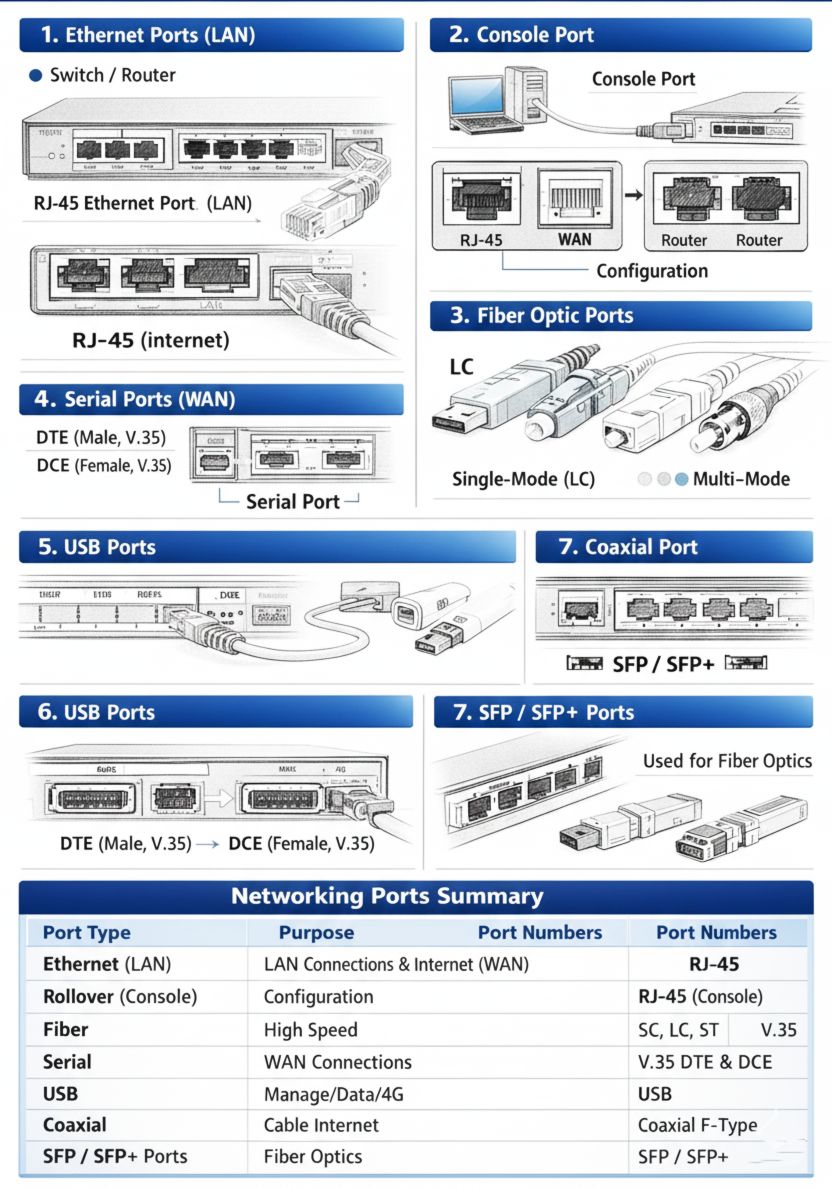
Ethernet Ports (RJ-45)
The RJ-45 (Registered Jack 45) is the ubiquitous standard for wired networking.
- Usage: Local Area Network (LAN) and Wide Area Network (WAN) connections.
- Speeds: 10/100 Mbps (Fast Ethernet), 1 Gbps (Gigabit), 2.5G/5G (Multi-Gigabit), and up to 10 Gbps.
- Connector: 8-pin modular connector.
- Key Fact: These ports are usually “autosensing,” meaning they can detect the speed of the connected device and adjust accordingly.
Cable Recommendation: Twisted Pair (UTP/STP)
Cable: Cat5e, Cat6, or Cat6a.
Why: Cat6a is the current “best choice” because it supports 10Gbps up to 100 meters and provides superior crosstalk protection compared to older standards.
Technical Concept (PoE):
Many Ethernet ports support Power over Ethernet (PoE).
- 802.3af (PoE): Up to 15.4W.
- 802.3at (PoE+): Up to 30W.
- 802.3bt (Hi-PoE/UPoE): Up to 60W-100W for PTZ cameras and thin clients.
Console Ports
The Console Port provides “out-of-band” management, meaning you can access the device even if the network is down.
- Usage: Initial configuration, password recovery, and low-level troubleshooting.
- Interface: Traditionally RJ-45 (using a rollover cable), but modern devices often use Mini-USB or USB-C.
- Connection: Usually connects a technician’s laptop directly to the router or switch’s operating system.
- Technical Concept: Unlike Ethernet, Console ports do not use IP addresses. They use asynchronous serial communication (Baud rates, typically 9600).
Cable Recommendation: Rollover or USB-C
Cable: RJ-45 Rollover Cable (Sky Blue) or standard USB-C to USB-A/C.
Why: Rollover cables pin-out is reversed specifically for console-to-PC serial communication. USB-C is preferred in modern racks for driverless ease of use.
Management (MGMT) Port
A dedicated Ethernet port used exclusively for remote management traffic.
- Separation: Unlike standard ports, traffic on the MGMT port is isolated from the data plane.
- Security: Allows administrators to manage the device through a dedicated Management VLAN or network, preventing end-user access to management interfaces.
- Usage: SSH, HTTPS, and SNMP monitoring.
Cable Recommendation: Cat6 UTP
Cable: Cat6 Ethernet (Color-coded Red or Yellow for management).
Why: Since management traffic is low-bandwidth, Cat6 is more than sufficient and allows for easier organization in high-density racks.
Fiber Optic Ports
Connector Types
- LC (Lucent Connector): Small form factor, very common.
- SC (Subscriber Connector): Larger, square “push-pull”.
- ST (Straight Tip): Older, bayonet-style twist lock.
- MPO/MTP: Multi-fiber connectors for 40G/100G+ links.
Fiber Modes
- Single-Mode (SMF): Long distances. Narrow core (9 microns).
- Multi-Mode (MMF): Short distances. Wider core (50/62.5 microns). OM3/OM4/OM5 standards.
Cable Recommendation: Aqua (MMF) or Yellow (SMF) Patch Cords
Cable: Duplex LC-LC Fiber Patch Cable.
Why: LC connectors are the standard for high-density SFP ports. Aqua color (OM3/OM4) ensures easy identification of 10G multimode links.
Serial Ports (Legacy WAN)
While being phased out in favor of Ethernet and Fiber, serial ports were the standard for long-distance WAN links.
Cable Recommendation: Smart Serial or DB60
Cable: Cisco Smart Serial or DB60-to-V.35.
Why: These proprietary connectors allowed for multiple signaling standards (V.35, RS-232) to run over the same physical hardware interface.
USB Ports
USB ports on enterprise networking gear serve multiple functions:
Technical Sketch: USB Interface Types
FIG 6: standard geometric profiles for management & storage interfaces.
Coaxial Ports (F-Type)
Common for ISP cable modem connections using F-Type connectors.
Cable Recommendation: RG-6 Quad Shielded
Cable: RG-6 Coaxial Cable with compression F-connectors.
Why: Quad shielding protects the data signal from high-frequency interference, crucial for maintaining DOCSIS 3.1 speeds.
SFP / SFP+ Ports
Modular slots that provide ultimate flexibility through transceivers.
Cable Recommendation: Direct Attach Copper (DAC)
Cable: Passive Twinax SFP+ DAC.
Why: DAC cables are the “Best Choice” for short distances because they don’t require expensive transceivers, consume less power, and have lower latency.
Combo Ports (Shared Ports)
A pair of ports (one RJ-45 and one SFP) that share the same internal switch logic.
- Mutual Exclusion: You can use either the copper port or the SFP port, but not both at the same time.
- Identification: Usually marked on the switch faceplate with a line or a shared number (e.g., both ports labeled ’24’).
- Purpose: Provides design flexibility without increasing the total port count cost.
Stacking Ports
Specialized high-speed ports used to connect multiple physical switches so they operate as a single logical unit.
- Usage: Managing a “stack” via one IP address.
- Benefit: Increases backplane throughput and provides redundancy. If one switch fails, the stack continues to operate.
- Cables: Often use proprietary stacking cables or high-speed QSFP DACs.
Cable Recommendation: Proprietary Stack Cable
Cable: Manufacturer-specific Stack cable (e.g., Cisco StackWise).
Why: Specialized stacking cables provide extremely high-bandwidth (up to 480Gbps) paths that standard Ethernet cables cannot achieve.
Multimedia Ports (HDMI / DisplayPort)
Found on specialized networking devices like Collaboration Endpoints, Digital Signage Players, and NVRs (Network Video Recorders).
- HDMI: For outputting video streams directly from a surveillance system or conferencing codec.
- DisplayPort: Common in high-end workstations and server management (KVM).
Cable Recommendation: HDMI 2.1 or DP 1.4
Cable: High-Speed HDMI or Active DisplayPort Cables.
Why: Version 2.1 (HDMI) ensures support for 4K video surveillance feeds at high refresh rates, providing smoother forensic analysis.
Physical Port Maintenance
Physical ports are subject to wear, dust, and environmental damage. Proper maintenance extends the life of multi-thousand dollar hardware.
Maintenance Tasks:
- Use Dust Covers for unused SFP slots.
- Clean Fiber tips with One-Click Cleaners.
- Periodically inspect RJ-45 pins for corrosion.
- Ensure proper Cable Management to avoid port tension.
Port Lifespan Facts:
- RJ-45: Typically rated for ~1,000 insertion cycles.
- SFP Slots: More durable, but transceivers can overheat if blocked.
- Fiber: Extremely sensitive to contamination (90% of failures are due to dirt).
???? Architectural Best Choice & Security
⚠️ Port Security Best Practices
- Shut Down Unused Ports: Always disable (admin down) ports that are not in use to prevent unauthorized access.
- MAC Filtering: Limit a port to only allow specific MAC addresses.
- Sticky MAC: Dynamically learn and lock the first MAC address that connects to the port.
- DHCP Snooping: Prevent rogue DHCP servers from being plugged into user-facing ports.
| Scenario | Best Choice Port | Recommended Cable | Reason |
|---|---|---|---|
| Connecting End-Users | Ethernet (RJ-45) | Cat6a UTP | Cost-effective, supports PoE, future-proof for 10G. |
| Inter-Switch Links (Short) | SFP+ Slot | Passive DAC Cable | Lowest latency and lowest cost for 10G in-rack. |
| Inter-Switch Links (Long) | SFP+ Slot | Aqua LC-LC MMF | High speed over distances up to 550m. |
| Building-to-Building | Fiber SFP/SFP+ | Yellow LC-LC SMF | Necessary for 550m+; immune to EMI. |
| ISP Connection (Business) | SFP+ or Ethernet | SMF Fiber or Cat6 | Standard for enterprise fiber handoff. |
| Initial Setup | Console | USB-C or Rollover | Out-of-band access for zero-config devices. |
| Remote Admin Traffic | MGMT Port | Cat6 (Isolated) | Separates management from user data plane. |