UI vs UX: What’s the Difference between UI & UX Design?
Comprehensive Guide (Updated with Process Flow & Career Paths)
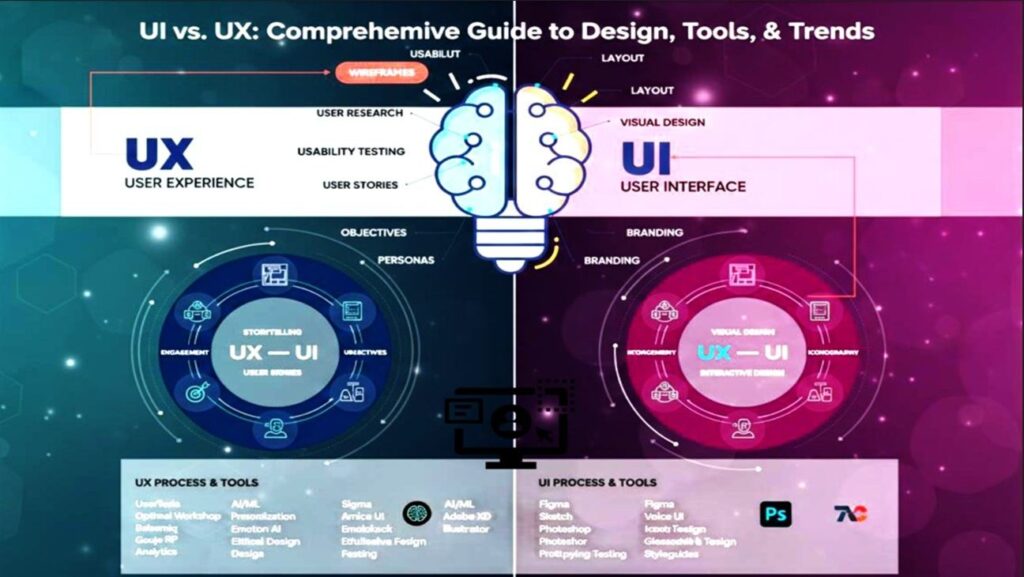
UI (user interface) and UX (user experience) design make apps and websites easily understood. UI focuses on the visual elements (colors, buttons, layout), while UX centers on the ease and effectiveness of interacting with those elements.
This guide explores the distinctions between UI and UX, emphasizing their combined importance in creating user-friendly products, and offers effective strategies for launching a career in the evolving in digital Era landscape.
What is UI Design? (The Visual Blueprint)
User Interface (UI) design to focuses on the visual elements directly engaged by users. UI designers are responsible for creating widely appealing interfaces that are easy to use, feels, emphasizing aesthetics, motion, and visual components such as buttons, icons, and menus.
Key Features of Modern UI Design:
- Visual Systems (Design Tokens): Beyond simple colors and fonts, UI involves managing codified design variables (tokens) to ensure rapid, scalable design execution.
- Micro-Interactions & Motion: Designing subtle animations and transitions that provide immediate feedback and significantly improve the perceived quality and usability of the interface.
- Consistency & Scalability: Ensuring the interface is consistent across all pages and platforms, often achieved by building and maintaining Design Systems—the single source of truth for all UI components.
- Responsiveness & Adaptability: Designing interfaces that work flawlessly on different devices and screen sizes, from smartwatches to large interactive displays.
- Aesthetics and Brand Alignment: Using visual design to communicate the brand’s personality while ensuring optimal contrast and readability (Accessibility).
What is UX Design? (The Logic and Empathy Engine)
User Experience (UX) design revolves around creating a comprehensive, empathetic user journey within a product or service. It involves crafting experiences that deeply connect with users, encompassing strategy, usability, functionality, and ethical design. UX designers prioritize understanding users’ emotions and motivations, ensuring a seamless, satisfying interaction that solves a real problem.
Key Features of Modern UX Design:
- Continuous User Research: Moving beyond one-off surveys to continuous integration of user feedback and behavioral data (quantitative and qualitative).
- Usability Testing & Experimentation: Rigorous testing and A/B experiments to validate design hypotheses and measure the impact of design changes on key business metrics.
- Information Architecture & Strategy: Structuring complex data and content in an effective, logical, and future-proof way (e.g., designing content for headless CMS or multi-platform deployment).
- Wireframing and Rapid Prototyping: Creating simplified outlines and high-fidelity interactive models rapidly to test complex interactions and user flows early in the development cycle.
- Ethical Design & Inclusivity: Proactively designing to mitigate bias, protect user privacy, and ensure maximum accessibility for diverse groups.
Integrated UI/UX Design Process Flow (Block Diagram)
The diagram below illustrates how UX, UI, and engineering teams collaborate. UX lays the foundation, UI provides the polish, and Engineering brings it to life. This is often an iterative, cyclical process.
Conceptual Block Flow Diagram: UI/UX Project Lifecycle
The 5 Stages of the Core UX Design Process (Design Thinking)
Most modern UX work follows the Design Thinking framework, ensuring solutions are human-centered, feasible, and viable.
1. Empathize (What are the users’ needs?)
Gathering data through user interviews, contextual inquiries, and competitor analysis to truly understand the user’s perspective, pain points, and motivations.
2. Define (What is the problem?)
Synthesizing the research findings to define a clear, actionable problem statement (often called a Point-of-View or ‘How Might We’ statement). This phase focuses on the user’s need, not a solution.
3. Ideate (What are potential solutions?)
Brainstorming a wide range of creative solutions without judgment. Techniques include sketching, concept mapping, and Crazy Eights. The goal is quantity over quality at this stage.
4. Prototype (How does it look and feel?)
Building physical or digital representations (wireframes, mockups, interactive prototypes) of the selected ideas to test feasibility and usability.
5. Test (Did it work?)
Testing the prototypes with real users to gather feedback, identify flaws, and measure success metrics. The findings from this stage directly loop back to the Empathize or Define stages to refine the solution (iteration).
Difference Between UI and UX Design: The Architecture Analogy
| Aspect | UX Design (The Architect/Structural Engineer) | UI Design (The Interior Designer/Finishes Specialist) |
|---|---|---|
| Role | Ensures the building is structurally sound, rooms are logically placed, and the purpose is fulfilled (Does the bathroom flow naturally from the bedroom?). | Selects the paint colors, lighting fixtures, and textures to make the structure beautiful and welcoming (What marble should the countertop be?). |
| Process | Defining user flow, functionality, and information structure (Sitemaps, User Research, Blueprints). | Finalizing visual designs, defining micro-interactions, and executing the style guide (Mockups, Design Tokens, CSS). |
| Focus | Holistic System: The entire product journey, from discovery to goal completion. | Specific Elements: Perfection of individual buttons, colors, animations, and typography. |
| Core Goal | Problem-Solving & Utility: Making the product useful, functional, and efficient. | Visual Appeal & Intuition: Making the product look great and feel effortless to use. |
| Measure of Success | Task Completion Rate, Time on Task, Error Rate, User Satisfaction. | Visual Hierarchy, Brand Consistency, Polish, and Aesthetic Appeal. |
The Future of UI/UX: 3 Key Trends to Master
The industry is rapidly evolving due to Artificial Intelligence (AI) and the shift toward immersive technologies. To stay ahead, designers must master these areas.
1. AI & Generative Design
AI is transforming the design process itself, moving from static mockups to automated, data-driven interfaces.
- AI Interaction Design: Designing the prompts, feedback loops, and guardrails for systems that generate content (like text or images) or perform complex actions.
- Prompt Engineering for Design: Developing specialized skills to articulate visual and functional needs to AI tools to generate design concepts, code snippets, or asset variations.
- A/B Testing Automation: Using AI to continuously test thousands of design variations to optimize for maximum user engagement without manual designer input.
2. Spatial and Immersive Experiences (3D/AR/VR)
Design is moving beyond the flat 2D screen into 3D space, driven by VR headsets and AR glasses.
- Spatial Design: Designing interfaces that exist in 3D environments, considering depth, distance, gesture-based interactions, and physical comfort (e.g., designing menus that float in mid-air).
- Haptics and Sensory Feedback: Designing the physical feedback (vibrations, sounds) that replaces clicks, enhancing realism and intuitive interaction in immersive settings.
- 3D Prototyping: Using tools like Spline or specialized features in Figma/other platforms to prototype volumetric interfaces.
3. DesignOps and Design System Maturity
As products scale, the efficiency of the design process becomes critical.
- DesignOps (Design Operations): Managing the tools, processes, and people to ensure design teams are highly efficient, consistent, and integrated with engineering teams.
- Accessibility as Standard: Moving beyond compliance check-boxes to genuinely inclusive design, integrating robust accessibility testing (WCAG 2.2+) directly into the design system from day one.
The Path to Becoming a UI/UX Designer in the Future
The foundational skills remain crucial, but future roles require greater technical fluency and strategic thinking about emerging technologies. Begin by mastering the core principles (research, wireframing, prototyping) but immediately seek opportunities to specialize in a future trend—be it designing for AI interactions, spatial computing, or leading DesignOps initiatives. Focus your portfolio on projects that solve problems using data and demonstrate your ability to adapt to new platforms. Get comfortable with popular design tools like Figma (the current industry standard), and don’t forget to connect with other designers online or in person—it’s a great way to learn more and find new opportunities.
UI/UX Designer Salary (U.S. Estimates)
| Position | Average Annual Salary (Estimate) | Key Note (Future Focus) |
|---|---|---|
| Junior/Entry-level | ~$70,000 – $85,000 | Focus on foundational skills; ability to use Design Systems effectively. |
| Mid-Level UX/UI | ~$100,000 – $110,000 | Requires 3-5 years experience; driving projects, maintaining Design Systems, and leading research. |
| Senior/Lead Designer | $130,000 – $160,000+ | Leading design strategy, mentoring teams, and driving adoption of AI/Spatial Design principles. |
| Specialized Roles (e.g., AI Interaction) | $150,000 – $200,000+ | Requires deep expertise in new technologies (AI, AR/VR) and the ability to define novel interaction patterns. |
Popular Online Courses & Certifications for UI/UX Design
The best foundational courses remain relevant, but look for programs that integrate AI tools and inclusive design into the curriculum.
1. Professional Certificates (Best for Foundational Knowledge)
| Program | Platform | Focus | Time Commitment | Key Takeaway |
|---|---|---|---|---|
| Google UX Design Professional Certificate | Coursera | Foundational UX concepts, design process, research, and prototyping using tools like Figma. | Approx. 6 months (part-time) | Highly recognized entry-level credential. Now including basic modules on responsible design. |
| IBM UX Design Professional Certificate | Coursera | Enterprise design thinking, user research, and Agile project management specific to larger organizations. | Approx. 4 months (part-time) | Focuses on a structured, business-oriented design process and DesignOps principles. |
| Specialized Design Programs | Various (MasterClass, Interaction Design Foundation) | Look for courses focused on Behavioral Science, Ethical AI, and Haptics. | Varies | Excellent for adding unique, future-proof skills to your resume. |
2. Immersive Bootcamps (Best for Fast Career Changes)
| Program | Provider | Focus | Time Commitment | Key Takeaway |
|---|---|---|---|---|
| Springboard (UX Design Bootcamp) | Springboard | Mentor-led program focusing on portfolio creation, emphasizing Design Systems and advanced research methods. | 6–9 months | Strong focus on hands-on project work that uses current industry tools and processes. |
| CareerFoundry (UX Design Program) | CareerFoundry | Comprehensive program covering the full UX process with dedicated mentorship and tutor support. | 6–10 months | Now placing heavier emphasis on accessibility compliance (WCAG) and complex interaction design. |
| General Assembly (UX Design Immersive) | General Assembly | Fast-paced class, great for structured learning. Often offers optional modules in AR/VR or conversational design. | 10–12 weeks (full-time) | Best for those who need a fixed schedule and direct instruction. |
3. Essential Skills to Master (The Future-Proof Toolkit)
- Figma & Advanced Features: Deep mastery of Auto Layout, Components, and Variables (Design Tokens) for building robust Design Systems.
- Prototyping & Flow Mapping: Ability to create highly realistic prototypes in Figma, and map out complex multi-modal user flows (e.g., voice + screen).
- Behavioral Science & Qualitative Research: Understanding *why* users act the way they do (not just *what* they do), combined with strong interviewing skills.
- Technical Fluency (CSS/HTML/API): The ability to communicate design feasibility and limitations clearly with engineering teams, especially concerning generative UI from code.
Essential Tools and Technologies for Modern Designers
The modern design toolkit is constantly evolving, but these categories represent the core software used daily.
UI/Prototyping & Handoff
- Figma: The undisputed industry standard for collaborative design, prototyping, and Design Systems.
- Sketch: Popular among macOS users; historically strong for vector UI design.
- Adobe XD: Cross-platform alternative, often integrated with the Adobe Creative Cloud suite.
- Webflow: Blurs the line between design and development, allowing designers to create production-ready code visually.
UX Research & Testing
- Miro/FigJam: Essential for digital whiteboarding, ideation, flow mapping, and workshops.
- UserTesting/Lookback: Platforms for conducting remote usability tests and gathering real-time user feedback.
- Optimal Workshop: Tools for running remote card sorting and tree testing to validate Information Architecture.
- Google Analytics/Hotjar: Quantitative tools for measuring user behavior, error rates, and identifying high-friction areas.